Showing posts with label SMath. Show all posts

Saturday, February 4, 2012

Create SMath launcher in Unity Environment (Ubuntu)

SMath requires mono to run. Running SMath from the terminal by typing a typical command
mono /folderlocation/SMathStudio_Desktop.exe

The following steps create an SMath launcher on unity desktop. Running SMath can be just clicking the launcher.

Step 1 - Installation gnome-panel
Open Ubuntu terminal: Ctrl+Alt+T
~$ sudo apt-get install gnome-panel

Step 2 - Create launcher using gnome-panel
~$ gnome-desktop-item-edit ~/Desktop/ --create-new
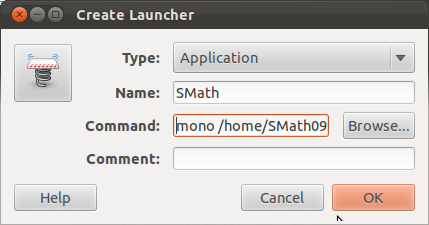
Name:       SMath
Command: mono /home/SMath091/SMathStudio_Desktop.exe

/home/SMath091 is the path location of the executable file SMathStudio_Desktop.exe

Confirming OK will create an icon on your desktop.
 Step 3 - Change icon with SMath icon
  • Download SMath icon svg image (smath.svg) from this link and save in a folder
  • Right click the smath icon on your desktop then select properties
  • Click the icon, go to the folder where you save smath.svg
  • Now running SMath is just clicking this SMath icon.

Thursday, December 15, 2011

SMath in Ubuntu 11.10

SMath is a "free" mathematical program with paper-like interface and has numerous computing features. This useful mathematical tool can be used in Ubuntu 11.10 using mono.

SMath preparation:
a) Download SMath (develovep by Andrey Ivashov, many thanks)
b) From the folder Downloads, right click the *.tar.gz and select Extract Here
b) From Ubuntu Software Center, search winforms. You should be able to find libmono-winforms2.0-cil. You need to install this

Running SMath from terminal:
a) You need to open Ubuntu terminal (from Dash and type terminal), or Ctrl+alt+T
b) cd Downloads
c)
cd SMathStudioDesktop.0_89_8.Mono
d)
mono SMathStudio_Desktop.exe . Now SMath is ready to use.